
Lysa  0.0
Lysa 3D Engine
Coordinate system and math helpers

Lysa uses a right-handed, Y-up coordinate system throughout : in world space, view space, and all engine math helpers.
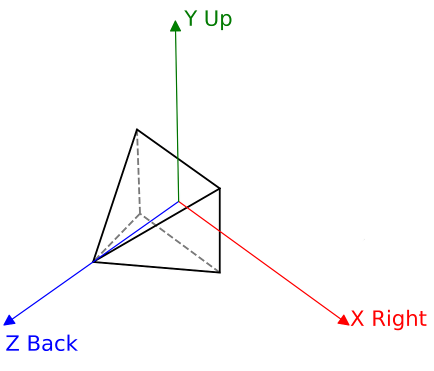
Coordinate system

Axes and named directions

Constant Value Semantic
AXIS_X / AXIS_RIGHT {+1, 0, 0} Right
AXIS_Y / AXIS_UP {0, +1, 0} Up
AXIS_Z / AXIS_BACK {0, 0, +1} Behind the camera (back)
AXIS_DOWN {0, −1, 0} Down
AXIS_FRONT {0, 0, −1} In front of the camera
AXIS_LEFT {−1, 0, 0} Left

The camera looks along −Z by default.

Note
The in-game debug overlay can display the coordinate axes at run-time. Enable it through DebugConfiguration::drawCoordinateSystem in lysa::ContextConfiguration.

Transform matrices

All transforms in Lysa are represented as row-major 4×4 matrices (float4x4 from hlslpp). Points and vectors are multiplied on the right:

float4 worldPos = mul(modelMatrix, float4(localPos, 1.0));

The standard transform pipeline is:

Clip = Projection × View × Model × LocalPosition

In shader code this is expressed as two sequential mul calls:

float4 positionW = mul(model, float4(input.position.xyz, 1.0));
float4 viewPos = mul(scene.view, positionW);
float4 clipPos = mul(scene.projection, viewPos);

The TRANSFORM_BASIS constant holds the identity float3x3 and can be used to extract local axes from any model matrix:

// Convert a local direction to world space using the model matrix
float3 worldDir = mul(float3x3(modelMatrix), localDir);

Common transform constructors

hlslpp provides static factory methods on float4x4:

// Translation
auto t = lysa::float4x4::translation(x, y, z);
// Uniform scale
auto s = lysa::float4x4::scale(2.0f);
// Rotations (angle in radians, right-handed)
auto rx = lysa::float4x4::rotation_x(lysa::radians(45.0f));
auto ry = lysa::float4x4::rotation_y(lysa::radians(90.0f));
auto rz = lysa::float4x4::rotation_z(lysa::radians(30.0f));
// Combine transforms: T × R (translate then rotate)
auto tr = lysa::mul(t, rx);
// Identity
auto id = lysa::float4x4::identity();

Rotations follow the right-hand rule: a positive angle around an axis corresponds to a counter-clockwise rotation when viewed from the positive end of that axis toward the origin.

View matrix

The view matrix is the inverse of the camera's world-space transform. In Lysa, lysa::Camera::transform stores the camera-to-world matrix and the GPU uniform receives the inverse:

sceneData.view = inverse(camera.transform);
sceneData.viewInverse = camera.transform;

To position a camera at world position (−8, 1.8, 0) looking along +X (rotated −90° around Y):

camera.transform = lysa::mul(
lysa::float4x4::rotation_y(lysa::radians(-90.0f)),
lysa::float4x4::translation(-8.0f, 1.8f, 0.0f)
);

A look-at helper is also available when targeting a specific world point:

// Right-handed look-at (eye, target, world-up)
auto viewMatrix = lysa::look_at(eye, center, lysa::AXIS_UP);

Projection matrices

Lysa provides two projection helpers:

Perspective :

// fov: vertical field of view in radians
// aspect: width / height
float4x4 proj = lysa::perspective(
lysa::radians(75.0f), // fov
renderTarget.getAspectRatio(), // aspect
0.01f, // near
100.0f // far
);

The matrix maps the view frustum to clip space with Z in [−1, +1] (OpenGL-style depth, right-handed). Vireo's backend translates this appropriately for Vulkan ([0, 1]) and DirectX ([0, 1]).

Orthographic :

float4x4 ortho = lysa::orthographic(
left, right, // horizontal extents
top, bottom, // vertical extents
znear, zfar // depth range
);

Rotations and Euler angles

Euler angles in Lysa follow XYZ order (pitch → yaw → roll), expressed in radians. The lysa::euler_angles function converts a quaternion:

lysa::quaternion q = lysa::to_quaternion(someMatrix);
lysa::float3 angles = lysa::euler_angles(q); // {pitch, yaw, roll} in radians

Gimbal lock can occur at ±90° pitch; use quaternions directly when continuity matters (animation, smooth camera rotation):

// Extract a quaternion from a rotation matrix
lysa::quaternion q = lysa::to_quaternion(rotationMatrix);
// Clamp the vertical camera angle using quaternion extraction
const auto pivotRotation = lysa::quaternion{lysa::float3x3{pivot->getTransform()}};
const float pitchRadians = static_cast<float>(lysa::euler_angles(pivotRotation).x);
const float clampedPitch = std::clamp(pitchRadians, maxAngleDown, maxAngleUp);

UV coordinates

Texture UV coordinates follow the top-left origin convention:

  • u = 0 is the left edge, u = 1 is the right edge.
  • v = 0 is the top edge, v = 1 is the bottom edge.

In vertex data, UVs are packed alongside the position and normal in float4 attributes to minimise attribute slots:

// In scene.inc.slang : GPU vertex layout
float4 position : POSITION; // position.xyz + uv.x in .w
float4 normal : NORMAL; // normal.xyz + uv.y in .w
float4 tangent : TANGENT; // tangent.xyz + bitangent sign in .w

On the CPU side the lysa::Vertex struct mirrors this:

struct Vertex {
float3 position; // local position
float3 normal; // surface normal
float2 uv; // UV coordinates
float4 tangent; // tangent + bitangent sign in .w
};

Screen and NDC space

After the projection, clip coordinates are divided by w to produce Normalized Device Coordinates (NDC):

  • X ∈ [−1, +1], left to right.
  • Y ∈ [−1, +1], bottom to top (right-handed convention).
  • Z ∈ [−1, +1] (before Vireo backend remapping).

Screen-space pixel coordinates (e.g. mouse position) follow the top-left origin** convention:

  • (0, 0) is the top-left corner of the viewport.
  • (width, height) is the bottom-right corner.

The conversion from pixel coordinates to NDC is:

float ndcX = (2.0f * pixelX) / screenWidth - 1.0f;
float ndcY = 1.0f - (2.0f * pixelY) / screenHeight; // Y is flipped

Unprojecting a screen point to a world ray

lysa::Camera provides screenToWorld to convert a pixel position into a world-space ray, useful for mouse picking and interaction:

lysa::Ray ray = camera.screenToWorld(
window.getMousePosition(), // float2 : pixel coord, top-left origin
float2{viewportWidth, viewportHeight}
);
// ray.origin — world-space start point
// ray.direction : normalized world-space direction

Axis-Aligned Bounding Boxes

AABBs are expressed in the same right-handed, Y-up space. The lysa::AABB struct stores min and max corners:

min = { left, bottom, back } → { min.x, min.y, min.z }
max = { right, top, front } → { max.x, max.y, max.z }

When a mesh instance is placed in the world, its local-space AABB is converted to a world-space AABB using the model matrix. If the transform contains rotation, the result is the smallest axis-aligned box that encloses the oriented box:

meshInstance.setAABB(
meshInstance.getMesh().getAABB().toGlobal(meshInstance.getTransform())
);

The GPU frustum culling compute pass reads these world-space boxes to discard invisible instances before generating indirect draw commands.