Lysa  0.0
Lysa 3D Engine
Custom Rendering

This page describes how to extend the rendering pipeline with custom GPU work: rendering phases, post-processing passes, shader-based materials, and custom render passes.

Note
The C++ samples use the base engine types. The Lua samples assume the scripting layer is enabled.

Table of contents


1. Pipeline overview

The renderer exposes several user-controllable insertion points. Three complementary mechanisms inject custom GPU work: rendering phases (lysa::RenderingPhase), post-processing compute passes (lysa::FullScreenCompute), and shader materials (lysa::ShaderMaterial). All three are orchestrated by lysa::Renderer, which owns every pass of a frame and drives their execution.

A rendering phase is a named slot in the frame graph. At each phase the engine first runs the built-in lysa::ShaderMaterialPass (drawing the objects whose material targets that phase), then every custom pass (lysa::CustomRenderpass) registered for that same phase. The position of each phase in the frame is fixed by the lysa::RenderingPhase enumeration.

Post-processing passes are full-screen compute passes chained together: each reads the color image produced by the previous one and writes its own output image. They are inserted after the color and bloom passes, but before the anti-aliasing pass.

1.1. Frame execution order

Frame step Value
Depth pre-pass
Shadow maps
Color pass (forward or deferred lighting)
AFTER_LIGHTING_PASS 0
AFTER_COLOR_PASS (DEFAULT) 1
Transparency pass (OIT)
AFTER_TRANSPARENCY_PASS 2
Bloom pass
AFTER_BLOOM_PASS 3
Post-processing compute (chain)
AFTER_POSTPROCESSING_PASS 4
Anti-aliasing (FXAA / SMAA)
AFTER_AA_PASS 5

2. Rendering phases

A rendering phase selects when, within the frame, a shader-based object or a custom pass is drawn. It is the common argument to all three mechanisms: a lysa::ShaderMaterial is bound to a phase at creation, and a lysa::CustomRenderpass is attached to a phase through lysa::Renderer::addRenderPass().

2.1. Choosing a phase

The phase determines which data is available and the resulting visual effect:

  • AFTER_LIGHTING_PASS — in deferred rendering, lighting is resolved but the image is not yet tonemapped or anti-aliased with TAA. Best for effects that must blend with the lit HDR scene (halos, additional volumetric contributions).
  • AFTER_COLOR_PASS (the DEFAULT value) — all opaque objects are drawn and TAA have been applied, but transparency is not yet composited. The default choice, suited to opaque shader-driven objects that must stay below transparent elements.
  • AFTER_TRANSPARENCY_PASS — the full scene (opaque + transparent) is composited. Use it for overlays that must sit after all scene content but before bloom.
  • AFTER_BLOOM_PASS — Bloom effect have been applied, if enabled. Use it for overlays that must not have a automatic blooming effect.
  • AFTER_POSTPROCESSING_PASS — the image is finalized without AA (tonemap). Use it for overlays that must be displayed without any post-processing effects or transparent objects that must show the overlays.
  • AFTER_AA_PASS — the image is finalized (tonemap, AA). Suited to UI or debug elements that must not undergo image processing and stay sharp.

On the implementation side, lysa::Renderer::renderCustomRenderPasses() selects the appropriate color target per phase: the raw target (selected in the lysa::RendererConfiguration) or current color target (generally the swap chain format). The lysa::ShaderMaterialPass for the phase runs first, then the custom passes in registration order.

2.2. Targeting a phase

The following creates a shader material rendered after transparency rather than at the default phase:

auto& shaderMat = materialManager.create(
"outline.frag", // fragment shader
"", // vertex shader (default)
0, // number of float4 parameters
mesh.setSurfaceMaterial(0, shaderMat.id);

3. Post-processing passes (add / remove)

A post-processing pass is a full-screen compute effect deriving from lysa::FullScreenCompute. The renderer keeps an ordered list of these passes, executed after the color and bloom passes and before anti-aliasing. Each pass reads the color image produced by the previous one and writes its own output image: the chain is therefore built in the order of the lysa::Renderer::addPostprocessing() calls.

3.1. Anatomy of a compute pass

The base constructor takes the renderer configuration, the output format, the compiled compute shader name, and an optional data block (uniform) specific to the pass:

FullScreenCompute(
const RendererConfiguration& config,
vireo::ImageFormat outputFormat,
const std::string& compShaderName, // pass identifier
void* data = nullptr, // uniform payload (optional)
uint32 dataSize = 0,
const std::string& name = "");

The shader receives a fixed set of inputs through a texture array, whose indices are exposed as constants: INPUT_BUFFER (HDR color), DEPTH_BUFFER, BLOOM_BUFFER, and two free slots OPT1_BUFFER / OPT2_BUFFER. The compute local workgroup size is TILE_SIZE = 16 and must stay consistent with the shader (postprocess.inc.slang).

3.2. Adding passes: addPostprocessing()

The caller retains ownership of the pass, which must outlive the lysa::Renderer (typically declared as a scene member). The add order fixes the apply order. Example: a Gaussian blur followed by a desaturation.

// Persistent scene members
lysa::BlurData blurData;
renderTarget.getRendererConfiguration(),
renderTarget.getImageFormat(),
"blur", // compiled compute shader in shaders/
&blurData, // uniform block
sizeof(lysa::BlurData));
renderTarget.getRendererConfiguration(),
renderTarget.getImageFormat(),
"greyscale"); // no data: data == nullptr
auto& renderer = renderTarget.getRenderer();
renderer.addPostprocessing(blur); // applied first
renderer.addPostprocessing(greyscale); // then applied on the blur result

lysa::Renderer::addPostprocessing() opens a command list, calls resize() on the pass to allocate its output image at the current extent, then appends the pointer to the list. The pass is ready for the next frame.

3.3. Updating uniform data

The uniform block passed at construction is re-uploaded every frame, so it is enough to modify the CPU-side struct. For resolution-dependent parameters, recompute them on the resize event:

void MyScene::onResize(const vireo::Extent& extent) {
blurData.update(extent, 2.0f); // radius in pixels
}

3.4. Removing a pass: removePostprocessing()

A pass is identified by its compute shader name (compShaderName). Two overloads exist: by name, or by reference to the object (which reuses the name internally). A missing pass is silently ignored.

renderer.removePostprocessing("greyscale"); // by shader name
renderer.removePostprocessing(blur); // by pass reference
Note
Because passes are identified by shader name, two passes sharing the same compute shader cannot be distinguished by removePostprocessing(const std::string&): removing by name removes all matching passes.

3.5. Visualizing an attachment (debug)

lysa::DisplayAttachment is a specialized post-processing pass that copies an internal attachment to the output. Use it to inspect a G-Buffer layer, ambient occlusion, a shadow map, or any intermediate result.

renderTarget.getRendererConfiguration(),
renderTarget.getImageFormat());
renderer.addPostprocessing(display);
// Pick the attachment to visualize
display.setAttachment(
.getAOPass().getColorAttachment(frameIndex));

4. Shader materials

A lysa::ShaderMaterial binds custom Slang shaders (fragment and, optionally, vertex) to a surface, together with a set of float4 parameters. Unlike a post-processing pass, which acts on the whole image, a shader material is rendered per object, at the chosen rendering phase, by the matching lysa::ShaderMaterialPass.

4.1. Creation through the MaterialManager

The lysa::MaterialManager offers create() overloads. Specify the fragment shader, optionally the vertex shader, the number of exposed float4 parameters, and the rendering phase.

auto& shaderMat = materialManager.create(
"uv_gradient.frag", // fragment shader (without extension)
"scale.vert"); // vertex shader (optional)
// float4 parameters read directly in the shader
shaderMat.setParameter(0, lysa::float4{gradient}); // fragment param
shaderMat.setParameter(1, lysa::float4{gradient}); // vertex param

The number of parameters is fixed at creation: setParameter(index, value) writes into an existing slot, and getParameterCount() returns the capacity. Internally, parameters are stored in a global SSBO and re-uploaded on demand through uploadParameters().

4.2. Assigning the material to a surface

// On the mesh: all instances inherit the material
mesh.setSurfaceMaterial(0, shaderMat.id);
// Or as an override on a specific instance, without modifying the mesh
instance.meshInstance.setSurfaceOverrideMaterial(0, shaderMat.id);
instance.meshInstance.removeSurfaceOverrideMaterial(0); // restore

4.3. Animating parameters per frame

Since parameters are plain CPU state synchronized to the GPU, animate them in the scene's processing loop, for example onPhysicsProcess():

void MyScene::onPhysicsProcess(const double delta) {
gradient = std::clamp(
gradient + gradientSpeed * static_cast<float>(delta), 0.0f, 1.0f);
if (gradient == 1.0f || gradient == 0.0f) {
gradientSpeed = -gradientSpeed;
}
shaderMat.setParameter(0, lysa::float4{gradient});
}
Note
Each shader material exposes a pipeline_id derived from its shader pair. When the set of materials changes, lysa::Renderer::updatePipelines() rebuilds the graphics pipelines of the relevant ShaderMaterialPass from the pipeline-to-materials mapping provided by the SceneFrameData.

5. Custom render passes (add / remove)

A lysa::CustomRenderpass injects arbitrary GPU work (graphics or compute) at a specific phase. It derives from lysa::Renderpass and has a single obligation: implement render(). It runs after the built-in ShaderMaterialPass of the same phase.

5.1. Interface to implement

class CustomRenderpass : public Renderpass {
public:
CustomRenderpass(const RendererConfiguration& config,
const std::string& name)
: Renderpass{config, name} {}
// Called once per frame for the associated phase
virtual void render(
const std::shared_ptr<vireo::CommandList>& commandList,
const std::shared_ptr<vireo::RenderTarget>& colorTarget,
const std::shared_ptr<vireo::RenderTarget>& depthTarget,
uint32 frameIndex) = 0;
};

The hooks inherited from lysa::Renderpass can also be overridden: resize(extent, commandList) to recreate resolution-dependent resources, and update(frameIndex) to refresh per-frame state. Both are no-ops by default.

5.2. A minimal custom pass

The following skeleton declares a pass that draws a scene outline. The phase's color and depth targets are provided every frame:

class OutlinePass : public lysa::CustomRenderpass {
public:
OutlinePass(const lysa::RendererConfiguration& config)
: CustomRenderpass{config, "Outline"} {}
void resize(const vireo::Extent& extent,
const std::shared_ptr<vireo::CommandList>& cmd) override {
// (re)create resolution-dependent resources
}
void render(
const std::shared_ptr<vireo::CommandList>& cmd,
const std::shared_ptr<vireo::RenderTarget>& colorTarget,
const std::shared_ptr<vireo::RenderTarget>& depthTarget,
uint32 frameIndex) override {
// record draw commands into cmd
}
};

5.3. Registering the pass: addRenderPass()

Attach the pass to a phase. As with post-processing, the caller retains ownership and the pass must outlive the lysa::Renderer.

OutlinePass outline(renderTarget.getRendererConfiguration());
auto& renderer = renderTarget.getRenderer();
renderer.addRenderPass(

On registration, lysa::Renderer::addRenderPass() calls resize() on the pass to size it to the current extent, then appends it to the phase list. Every frame, these passes are executed by renderCustomRenderPasses() in registration order, after the phase's ShaderMaterialPass.

5.4. Removing the pass: removeRenderPass()

Removal is by reference and requires the same phase used to add it. A pass not registered for that phase is silently ignored.


6. Comparison

The three mechanisms answer distinct needs:

Mechanism Scope Add / remove
lysa::ShaderMaterial Per object, at a phase MaterialManager::create() / destroy()
lysa::CustomRenderpass Free GPU work, at a phase addRenderPass() / removeRenderPass()
lysa::FullScreenCompute<td> Whole image, post-process chain addPostprocessing() / removePostprocessing()

Common points: (1) the caller retains ownership of added passes, which must outlive the lysa::Renderer; (2) on add, the engine sizes the pass to the current extent through resize(); (3) the add order determines the execution order within a phase or the post-processing chain.


7. Case studies

This section illustrates the mechanisms above with concrete cases from an imaginary game (isometric tactics). It features two full-screen custom render passes (ZoneOutlineRenderPass and FogOfWarRenderPass) and several shader materials driven from Lua (selection ring, highlight, transparency, health bars).

7.1. Full-screen graphics custom pass: zone outline

The ZoneOutlineRenderPass draws the glowing outline of zones where the player units can move (cyan) or dash (ligth yellow). It is a full-screen graphics pass: a full-screen triangle (quad.vert + draw(3)) reprojects each pixel into world space using depth and the inverse camera matrices, then tests its distance to the zone edges.
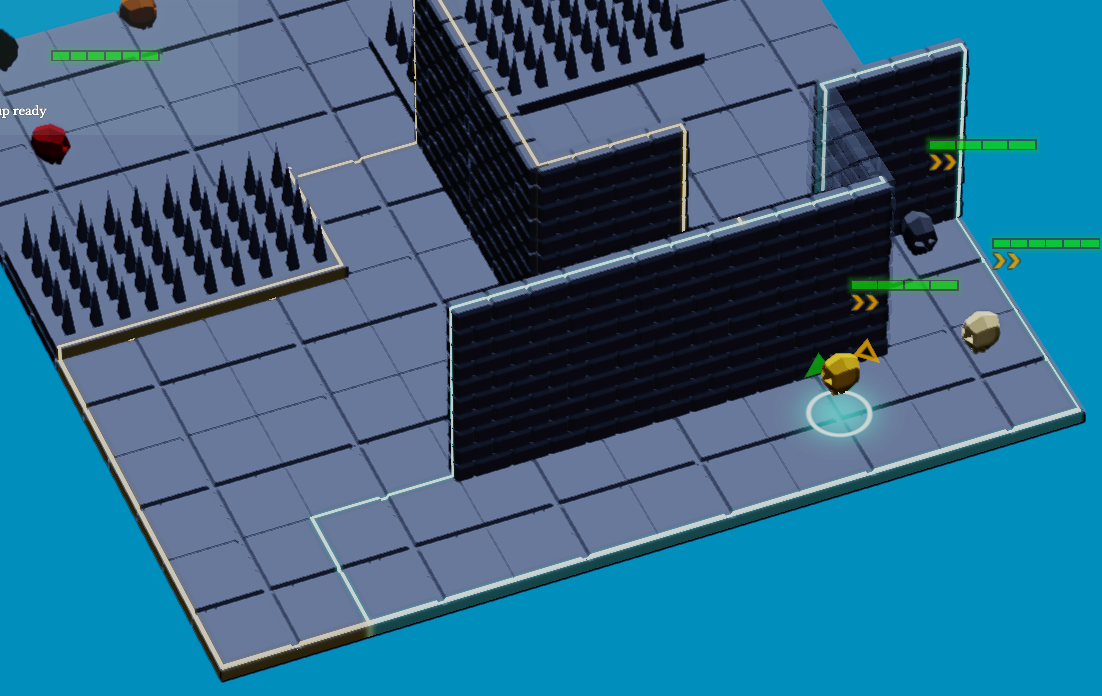
The two moving/dashing zone outlines

The constructor creates a descriptor layout (sampled depth, camera uniform, zones storage), a graphics pipeline with classic alpha blending, then allocates one FrameData per frame in flight (mapped camera uniform, staging + device buffer for the zones):

ZoneOutlineRenderPass::ZoneOutlineRenderPass(
const RendererConfiguration& config,
vireo::ImageFormat outputFormat) :
CustomRenderpass{config, "ZoneOutlineRenderPass"} {
descriptorLayout = ctx().vireo->createDescriptorLayout();
descriptorLayout->add(BINDING_DEPTH, vireo::DescriptorType::SAMPLED_IMAGE);
descriptorLayout->add(BINDING_CAMERA, vireo::DescriptorType::UNIFORM);
descriptorLayout->add(BINDING_ZONES, vireo::DescriptorType::DEVICE_STORAGE);
descriptorLayout->build();
pipelineConfig.resources = ctx().vireo->createPipelineResources(
{descriptorLayout, ctx().samplers.getDescriptorLayout()}, {}, name);
pipelineConfig.colorRenderFormats = {outputFormat};
pipelineConfig.vertexShader = loadShader(VERT_SHADER); // "quad.vert"
pipelineConfig.fragmentShader = loadShader(FRAG_SHADER); // "zone_outline.frag"
pipeline = ctx().vireo->createGraphicPipeline(pipelineConfig, name);
renderingConfig.colorRenderTargets[0].clear = false; // compose, do not clear
framesData.resize(ctx().config.framesInFlight);
for (auto& frame : framesData) {
frame.descriptorSet = ctx().vireo->createDescriptorSet(descriptorLayout, name);
frame.cameraBuffer = ctx().vireo->createBuffer(
vireo::BufferType::UNIFORM, sizeof(CameraData), 1, name + " Camera");
frame.cameraBuffer->map();
frame.zonesStaging = ctx().vireo->createBuffer(
vireo::BufferType::BUFFER_UPLOAD, sizeof(ZoneData), MAX_ZONES, name + " Staging");
frame.zonesStaging->map();
frame.zonesDevice = ctx().vireo->createBuffer(
vireo::BufferType::DEVICE_STORAGE, sizeof(ZoneData), MAX_ZONES, name + " Zones");
frame.descriptorSet->update(BINDING_CAMERA, frame.cameraBuffer);
frame.descriptorSet->update(BINDING_ZONES, frame.zonesDevice);
}
}

render() returns early if there is nothing to draw, writes the camera uniform (inverse projection and view), copies the zones from staging to the device buffer with the proper barriers, binds the depth received as a parameter, then draws the full-screen triangle. Note the barrier pair that transitions the color target from COMPUTE_READ to RENDER_TARGET_COLOR during the draw, and the depth from RENDER_TARGET_DEPTH to SHADER_READ, each transition being restored at the end of the pass:

void ZoneOutlineRenderPass::render(
const std::shared_ptr<vireo::CommandList>& commandList,
const std::shared_ptr<vireo::RenderTarget>& colorTarget,
const std::shared_ptr<vireo::RenderTarget>& depthTarget,
uint32 frameIndex) {
if (camera == nullptr || activeZoneCount == 0) { return; } // early out
auto& frame = framesData[frameIndex];
frame.cameraData.projectionInverse = inverse(camera->projection);
frame.cameraData.viewInverse = camera->transform;
frame.cameraData.screenSize = currentScreenSize;
frame.cameraData.activeZoneCount = activeZoneCount;
frame.cameraBuffer->write(&frame.cameraData);
frame.zonesStaging->write(cpuZones, sizeof(ZoneData) * MAX_ZONES);
commandList->barrier(*frame.zonesDevice,
vireo::ResourceState::SHADER_READ, vireo::ResourceState::COPY_DST);
commandList->copy(frame.zonesStaging, frame.zonesDevice);
commandList->barrier(*frame.zonesDevice,
vireo::ResourceState::COPY_DST, vireo::ResourceState::SHADER_READ);
frame.descriptorSet->update(BINDING_DEPTH, depthTarget->getImage());
renderingConfig.colorRenderTargets[0].renderTarget = colorTarget;
commandList->barrier(colorTarget,
vireo::ResourceState::COMPUTE_READ, vireo::ResourceState::RENDER_TARGET_COLOR);
commandList->barrier(depthTarget,
vireo::ResourceState::RENDER_TARGET_DEPTH, vireo::ResourceState::SHADER_READ);
commandList->beginRendering(renderingConfig);
commandList->bindPipeline(pipeline);
commandList->bindDescriptors({frame.descriptorSet, ctx().samplers.getDescriptorSet()});
commandList->draw(3); // full-screen triangle
commandList->endRendering();
commandList->barrier(depthTarget,
vireo::ResourceState::SHADER_READ, vireo::ResourceState::RENDER_TARGET_DEPTH);
commandList->barrier(colorTarget,
vireo::ResourceState::RENDER_TARGET_COLOR, vireo::ResourceState::COMPUTE_READ);
}

The pass overrides resize() only to record the screen size (used for reprojection) and exposes a small slot-based gameplay API: addZone(...) returns a slot (or -1 if full) and removeZone(slot) frees it. The pass stays generic; gameplay logic drives its content:

void ZoneOutlineRenderPass::resize(const vireo::Extent& extent,
const std::shared_ptr<vireo::CommandList>&) {
currentScreenSize = float2{float(extent.width), float(extent.height)};
}
int32 slot = zoneOutline.addZone(color, lineWidth, glowRadius,
worldW, worldH, cx, cz, surfaceY,
edgePoints, edgeCount);
// ... later ...
zoneOutline.removeZone(slot);

7.2. Composite custom pass: fog of war

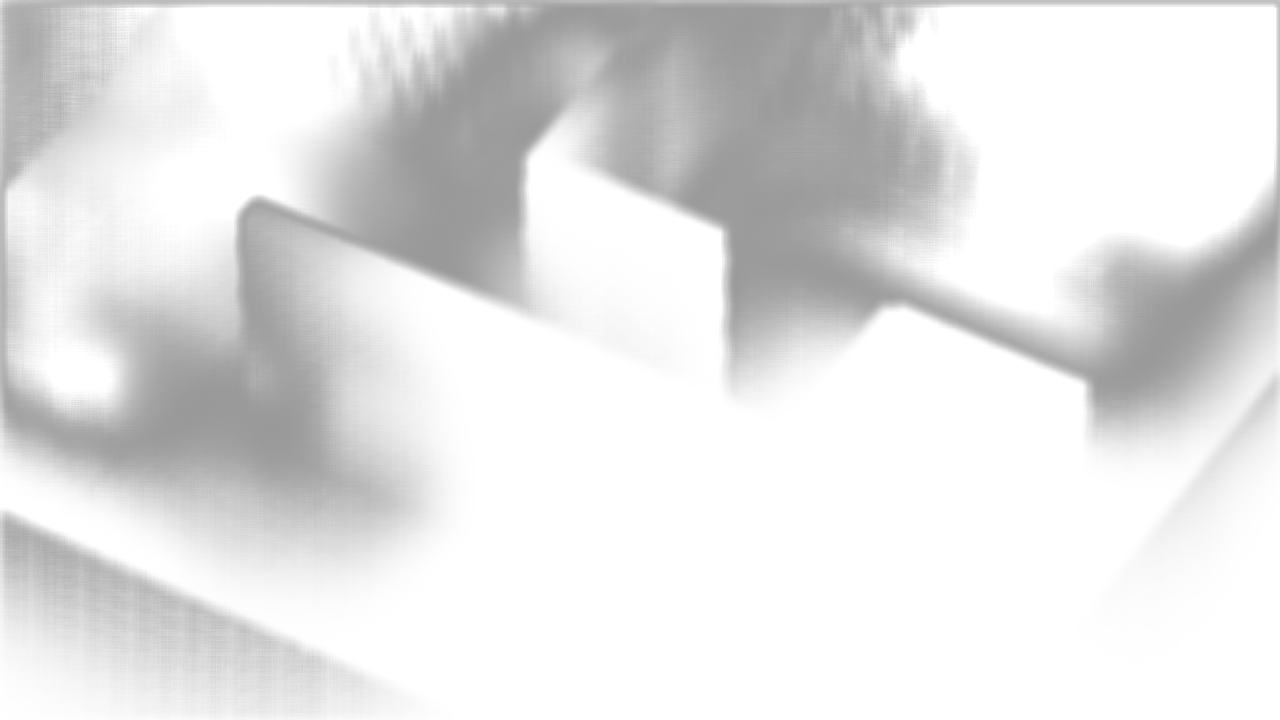
The FogOfWarRenderPass combines several building blocks: it wraps an internal compute pass (FogOfWarCompute, deriving from lysa::FullScreenCompute) computing per-cell fog density, a blur pass (lysa::FullScreenCompute with a lysa::BlurData), then a graphics composition step (fog_of_war_composite.frag) that blends the result onto the image. It is the example of a custom pass orchestrating its own sub-passes.
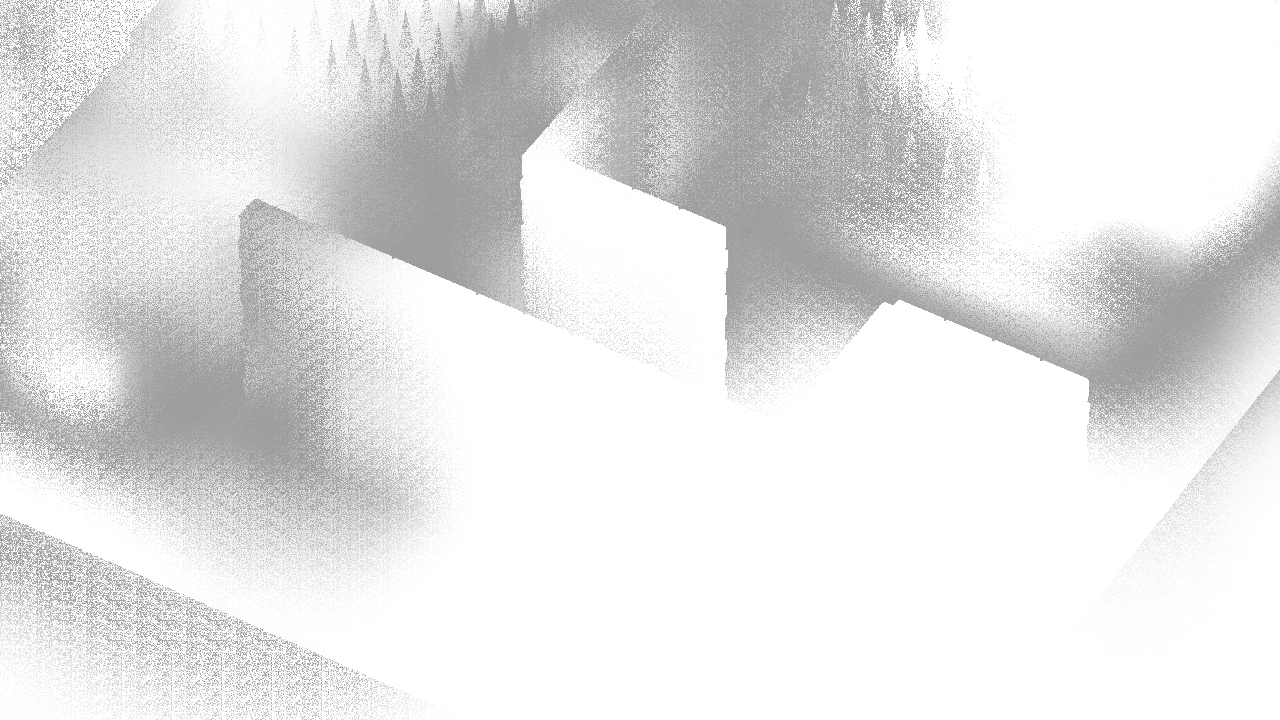
Fog of war fog render
Fog of war blur
Fog of war composition and final render
class FogOfWarRenderPass : public CustomRenderpass {
public:
explicit FogOfWarRenderPass(
const RendererConfiguration& config, vireo::ImageFormat outputFormat);
void setEnabled(bool enabled);
void setCamera(const std::shared_ptr<Camera>& camera);
void setGrid(float cellSize, int32 originX, int32 originY,
uint32 gridW, uint32 gridH);
void setCellsVisibility(const uint8* states, uint32 count);
void render(const std::shared_ptr<vireo::CommandList>& commandList,
const std::shared_ptr<vireo::RenderTarget>& colorTarget,
const std::shared_ptr<vireo::RenderTarget>& depthTarget,
uint32 frameIndex) override;
void update(uint32 frameIndex) override; // lazy data upload
void resize(const vireo::Extent& extent,
const std::shared_ptr<vireo::CommandList>& commandList) override;
private:
FogOfWarCompute fogCompute; // compute sub-pass
BlurData blurData;
FullScreenCompute blurPass; // blur sub-pass
// ... graphics composition pipeline ...
};
Note
A custom pass can hold lysa::FullScreenCompute members and drive them in its own render(). This keeps a multi-stage effect (compute + blur + composition) behind a single registration point, rather than exposing three separate passes to the renderer. The overridden update(frameIndex) only uploads visibility data when it changed (a cellsVisibilityDirty flag), avoiding a GPU transfer per frame when the game state is stable.

7.3. Registering the passes in the application

Both passes are application members, constructed with the render target configuration and format, then registered at the AFTER_COLOR_PASS phase. The registration order (zone outline then fog) fixes their execution order. They are also enrolled in the resource registry to be reachable from Lua:

Application::Application(const std::string& mainScript) :
/* ... */
fogOfWarRenderPass(
window.getRenderTarget().getRendererConfiguration(),
window.getRenderTarget().getRendererConfiguration().colorRenderingFormat),
zoneOutlineRenderPass(
window.getRenderTarget().getRendererConfiguration(),
window.getRenderTarget().getRendererConfiguration().colorRenderingFormat) {
auto& renderer = window.getRenderTarget().getRenderer();
renderer.addRenderPass(RenderingPhase::AFTER_COLOR_PASS, zoneOutlineRenderPass);
renderer.addRenderPass(RenderingPhase::AFTER_COLOR_PASS, fogOfWarRenderPass);
ctx().res.enroll(fogOfWarRenderPass);
ctx().res.enroll(zoneOutlineRenderPass);
}

The camera is passed to the passes once the scene is ready (here from Lua, via the bindings): fog_pass:set_camera(camera) and zone_outline_pass:set_camera(camera).

7.4. Shader material: selection ring

The ring under the selected unit is a quad carrying a lysa::ShaderMaterial. The material is created with two float4 parameters and rendered at the AFTER_TRANSPARENCY_PASS phase so it shows above the scenery.
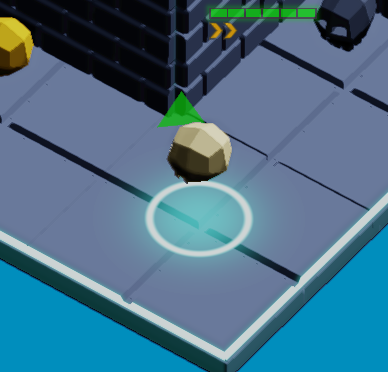
Unit selection glowing ring

On the Lua side:

local mat = ctx.res.material_manager:create_shader(
"selection_ring.frag", "",
2, -- number of float4 parameters
lysa.RenderingPhase.AFTER_TRANSPARENCY_PASS)
mat:set_parameter(0, consts.UNIT_SELECTION_RING_COLOR) -- RGBA color
mat:set_parameter(1, lysa.float4(
consts.UNIT_SELECTION_RING_RADIUS, -- .x radius
consts.UNIT_SELECTION_RING_WIDTH, -- .y width
consts.UNIT_SELECTION_RING_GLOW_RADIUS, -- .z glow
consts.UI_GAMMA)) -- .w gamma
local mesh = ctx.res.mesh_manager:create_quad(
consts.CELL_SIZE, consts.CELL_SIZE, mat.id,
lysa.MeshAlignment.CENTER, "SelectionRingQuad")

The fragment shader reads these parameters through shaderMaterialParameters[mat.parametersIndex + i]. Index 0 holds the color, index 1 decomposes radius, width, glow radius and gamma — exactly the values pushed by set_parameter:

// selection_ring.frag.slang
float4 color = shaderMaterialParameters[mat.parametersIndex + 0];
float ring_rad = shaderMaterialParameters[mat.parametersIndex + 1].x;
float ring_w = shaderMaterialParameters[mat.parametersIndex + 1].y;
float glow_rad = shaderMaterialParameters[mat.parametersIndex + 1].z;
float gamma = shaderMaterialParameters[mat.parametersIndex + 1].w;
float2 p = input.uv - float2(0.5, 0.5);
float dist = length(p);
float ring = smoothstep(ring_w, 0.0, abs(dist - ring_rad));
float glow = exp(-dist * dist / (glow_rad * glow_rad)) * color.a;

7.5. Shader material: global materials per phase

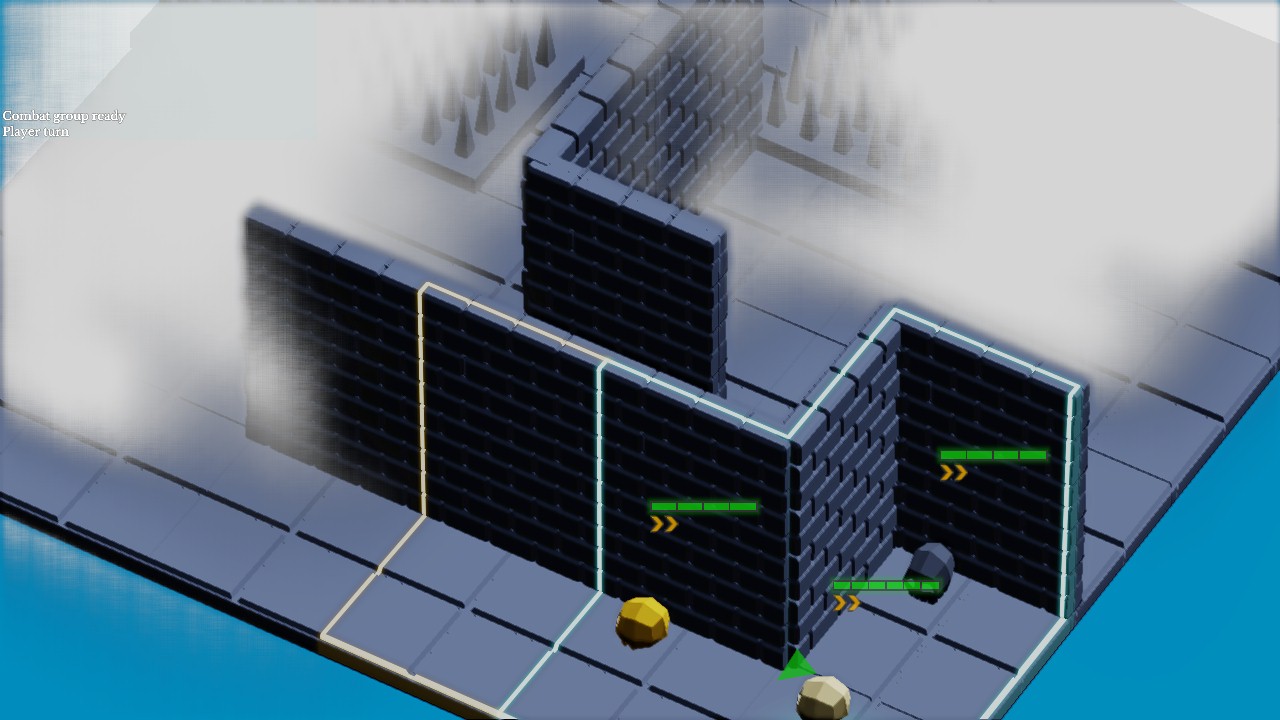
This example use shader materials to show how the phase controls composition to add transparency to static object that hide the player units.
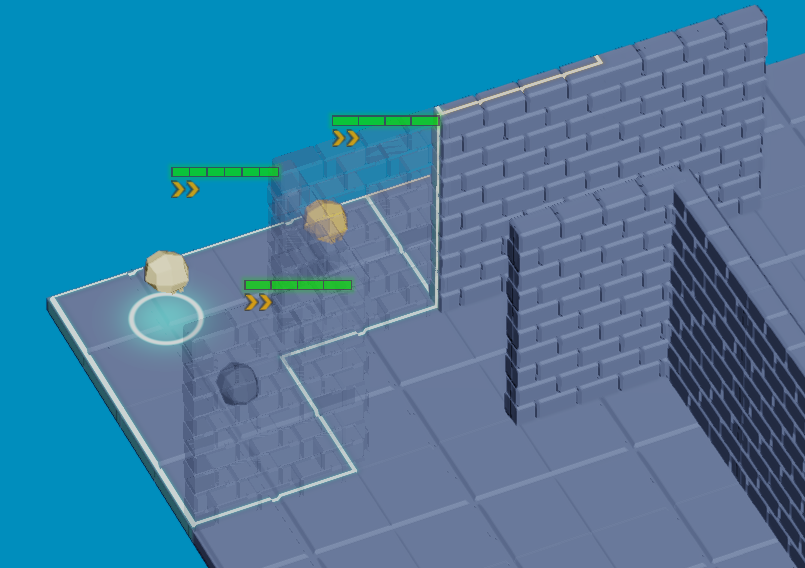
Transparents wall that shows the units and the selection ring/moving zones overlays

The transparency veil is rendered at AFTER_BLOOM_PASS, after the overlays:

-- Semi-transparent veil: 1 parameter, after bloom
self.transparency = ctx.res.material_manager:create_shader(
"transparency.frag", "", 1, lysa.RenderingPhase.AFTER_BLOOM_PASS)
self.transparency:set_parameter(0, lysa.float4(0.0, 0.0, 0.0, 0.25))

The shader use the pre defined fonctions fetchColor() and getColor() to fetch the color of the material and the color of the mesh surface with the lightings and shadows applied, taken from the forward renderer shaders :

// transparency.frag.slang
#include "forward/forward.inc.slang"
FragmentOutput fragmentMain(VertexOutput input) : SV_TARGET {
FragmentOutput output;
Material matOrig = materials[input.meshSurfaceMaterialIndex];
output.color = fetchColor(input.uv, matOrig);
output.color = getColor(input, matOrig, output.color);
Material mat = materials[input.materialIndex];
output.color.a = shaderMaterialParameters[mat.parametersIndex + 0].a;
output.brightness = float4(0.0, 0.0, 0.0, 1.0);
return output;
}
Note
The health bars and action points chevrons also uses a quad (without a camera projection to always face the camera) with a lysa::ShaderMaterial and are rendererd at AFTER_AA_PASS to stay perfectly sharp as an overlay.